RoomGPT by ArchiVinci: Describe the Change, See It on Your Room Photo
RoomGPT is room plus GPT: you tell an AI in plain words how a room should change and see it on your own photo. RoomGPT by ArchiVinci runs in ArchiVinci's Interior tool. Upload a photo and describe the change, or copy one of the RoomGPT prompts below. A new account comes with 3 free credits.
No CAD or 3D skills needed
No GPU needed, runs online in your browser
You steer it in your own words

What Is RoomGPT?
RoomGPT (also written Room GPT or RoomGPT AI) joins two words, room and GPT: an AI that redesigns a room from a photo and a written request. You upload a photo, say in a sentence what should change, and get a new version of that room back.
The GPT part is the way you ask. As with a chat assistant, you describe what you want in your own words, with no style menus to click through and no 3D model to build. Ask for a new wall color, a different sofa or a whole new look, and the AI redraws your photo.
RoomGPT by ArchiVinci is our name for doing this in ArchiVinci's Interior tool. It is not a separate tool: the Try RoomGPT button opens Interior, where you upload your photo and type your prompt.
Is RoomGPT Free?
RoomGPT by ArchiVinci is free to try. You need an account, and a new account gets 3 free credits. Each result uses one credit.
How much does RoomGPT cost?
RoomGPT by ArchiVinci costs nothing for the first 3 credits. After that you need a paid plan, either a subscription (weekly, monthly or yearly) or a one-time package. Prices differ by country, so see ArchiVinci's plans and prices.
How Does RoomGPT Work?
Our process is simple and intuitive. Go from a photo to a stunning new design in just a few minutes.

Step 1
Upload a Photo of Your Room
Open ArchiVinci's Interior tool with the Try RoomGPT button and upload one photo of your room. You need an ArchiVinci account to upload.
Step 2
Describe the Change You Want
Type a short description into the field labeled Prompt, or paste a RoomGPT prompt from the list below.
Step 3
Get Your Result and Refine It
Your photo and the result appear together in a before/after view. If the result misses, reword the prompt and run the photo again. On a free account, every result and every edit uses one credit.
How to photograph the room and what to ask for in each room are on the AI room design page.
RoomGPT Prompts to Copy
On this page, a RoomGPT prompt is the short description that tells ArchiVinci's Interior tool what to change. Copy one into the Prompt field, swap the room or a color for your own and run it. You can also paste one into ChatGPT, or a one-change goal prompt into Gemini, as a room design prompt (steps below).
Prompts by Look
Mid-century modern living room, walnut sideboard, mustard armchair, teak coffee table
Modern farmhouse kitchen, cream Shaker cabinet doors, dark stone countertop, black handles
Scandinavian bedroom, white walls, birch bed frame, gray wool throw
Bohemian living room, rattan armchair, kilim rug, terracotta cushions
Industrial home office, reclaimed wood desk, black steel shelving, brown leather chair
Japandi bedroom, dark wood platform bed, off-white bedding, black bedside lamp
Coastal bedroom, sand-colored walls, rattan headboard, blue striped bedding
Minimalist bathroom, large gray stone tiles, floating oak vanity, frameless mirror
Mediterranean kitchen, terracotta floor tiles, white plaster walls, blue patterned backsplash
Art Deco dining room, dark green walls, velvet chairs, brass pendant light
Prompts by Goal
Try a wall color: Sage green walls with white trim
Try a new floor: Walnut herringbone floor
Lighten a small room: White walls, pale wood furniture, one large wall mirror
Go darker and bolder: Charcoal walls, cognac leather sofa, brass side table
Restyle a rental: Olive green sofa, cream wool rug, linen curtains
Change the textiles: Rust linen bedding, cream curtains, jute rug
Warm up a white room: Cream walls, warm wood furniture, ochre cushions
Repaint kitchen cabinets: Navy blue kitchen cabinet doors with brass handles
Update a bathroom's finishes: White subway tile walls, walnut vanity, matte black faucet
Add one accent color: Deep blue armchair, curtains and cushions
Write Your Own Prompt in One Line
Room + look + two or three things that change
Say only what should be different.
The default settings already tell the AI to make a photorealistic picture and keep your photo's perspective, geometry and colors. So name every color you want changed.
Stay under 200 characters.
The tool warns above that, and its tips say long, complex prompts can confuse the AI.
Leave lighting words out.
Pick one of the tool's six lighting options instead: daylight, golden hour, warm, soft ambient, neon or studio.
When the Result Misses: What to Change
What you see - What to change
Hardly anything changed → Rephrase: name the look and two or three pieces with their color or material.
Too much changed → Ask for fewer things at once.
One piece is wrong → Mark it with the edit tool and describe it.
Odd details nobody asked for → Run it again. The tool's own tips call AI image generation "a trial and error process."
RoomGPT vs. ChatGPT and Gemini
ChatGPT and Gemini are general assistants with an image tool. RoomGPT by ArchiVinci runs in a tool built for interiors.
Can ChatGPT or Gemini design a room from a photo?
Yes. Both can edit a photo you upload, so you attach a room photo and describe the change in the chat. People search for this as ChatGPT room design or ChatGPT interior design. Image editing is on ChatGPT's Free plan and in Gemini without a paid plan, both with usage limits. The table shows what OpenAI's and Google's own pages say, as of October 2026.
ChatGPT | Gemini | ArchiVinci RoomGPT |
|---|---|---|
You can describe the edit in chat or select the part of the image you want to change. | Describe the changes you want in words. | Enter a short prompt and choose from six lighting options. |
ChatGPT aims to keep the rest of the photo unchanged, though OpenAI's developer guide notes that repeated edits can alter details you meant to preserve. | Google's blog says Gemini changes only the parts you ask it to, leaving the rest of the photo unchanged. A model card for one of Google's image models also lists known limitations for image editing. | The default settings instruct RoomGPT to preserve the rest of the photo, though small details can still shift. |
For room edits, ChatGPT offers a preset prompt named "Interior design". | Google's blog includes room examples using Gemini. | RoomGPT includes a before/after view and lets you edit one marked area of the room. |
How to Ask ChatGPT to Design or Decorate a Room
To use ChatGPT to design or decorate a room from a photo (OpenAI's advice below is as of October 2026):
1. Attach your room photo to a message.
2. Paste a RoomGPT prompt from the list above, or describe the change yourself.
3. Say what must stay. OpenAI's image prompting guide for developers advises naming the change and listing what to keep. In our words, you could add: "Change only what I described. Keep the camera angle, walls, windows and doors as they are."
4. For one spot, select that part of the image or name it. OpenAI warns that an edit can extend beyond the selected area.
5. Compare every result with your photo.
How to Ask Gemini to Design a Room
In the Gemini app (signed in, 18 or older), attach your room photo and ask for one change. The room examples in Google's blog, as of October 2026, are one change each: paint the walls a new color, place a sofa near the window, add bookshelves. The one-change goal prompts above, such as the wall color or the floor, can serve as an interior design prompt for Gemini.
When to Use ChatGPT or Gemini Instead
If you already use ChatGPT or Gemini and want to change one or two things in a photo inside a conversation, you can do that there. ArchiVinci's RoomGPT adds the instruction to keep your photo's perspective, geometry and colors for you on its default settings. You get 3 free credits, then you need a paid plan.

Other ArchiVinci Tools Besides RoomGPT
RoomGPT by ArchiVinci changes a whole room photo in the Interior tool. For other jobs, ArchiVinci has other tools.
One part of a photo:
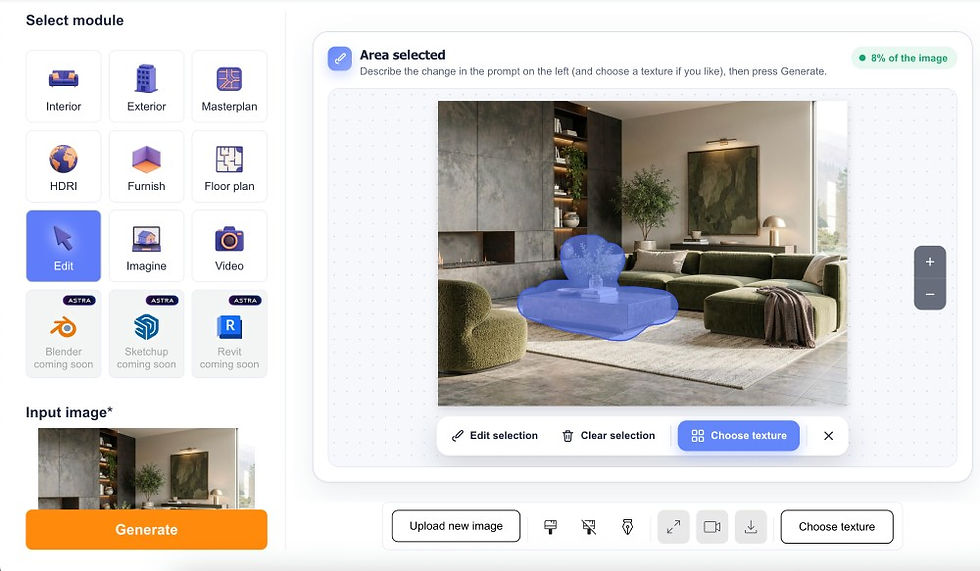
Mark the area and describe the change, such as "replace the sofa with a green velvet one", "paint this wall terracotta" or "remove the armchair". More about that tool is on the modify a room photo


More AI tools: our blog lists the best AI interior design tools
Frequently Asked Questions (FAQ)
Is RoomGPT free to use?
Yes, to try. RoomGPT by ArchiVinci gives a new account 3 free credits, and each result uses one. After that you need a paid plan.
Is there a RoomGPT app?
No app is needed. RoomGPT by ArchiVinci runs online in your browser, on a computer or a phone, and there is nothing to install.
Do I need to create an account to use RoomGPT?
Yes. With ArchiVinci's RoomGPT you need an account before you can upload a photo, and the 3 free credits come with it.
Can I use RoomGPT for professional or commercial projects?
Yes. RoomGPT by ArchiVinci makes pictures for client presentations, early concepts and listing visuals. The result is a picture, not a technical drawing. Usage rights depend on your paid plan and are detailed in the terms of service.
Can I edit or refine designs after they are generated?
Yes. Open the edit tool under a result, mark an area and describe the change for that part. Or run the same photo again with a reworded prompt. There is no one-click tool that changes only the lighting or turns the view.
Can I save and download my designs?
Yes. Every result has a Download button, and the tool lists your last 20 results. Saved results are removed after 7 days, so download the ones you want to keep. ArchiVinci adds no watermark.
Who owns the images created with RoomGPT?
ArchiVinci's terms of service decide that. Images you generate with ArchiVinci's RoomGPT can be used for personal and professional purposes, and usage rights depend on your paid plan.
Does RoomGPT require a GPU or special hardware?
No. ArchiVinci's RoomGPT runs online in your browser, and the result is generated on remote servers, so you need no GPU and nothing to install.
Do I need design or 3D experience to use RoomGPT?
No. With ArchiVinci's RoomGPT you need no design, CAD or 3D experience. A photo of your room and a one-line prompt are enough.