
AI Villa Design: Render Villa Exteriors and Interiors from a Sketch or Photo
Upload a sketch, a photo or a 3D model view of a villa and describe the design. ArchiVinci renders the façade, the interiors and the garden as realistic images.
What You Can Create with AI Villa Design?

Private Luxury Villas

Mediterranean Villas
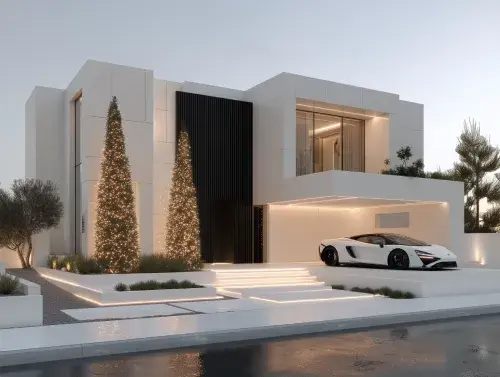
Modern Villas

Concept Villas
Turn Your Villa Sketch into a Render
Upload a hand sketch, a model view or a photo of the house and see the façade, the terraces and the pool in realistic light.
AI Villa Design from a Sketch, a Photo or a 3D Model
A villa is judged as a whole: the silhouette, the materials, the terraces, the pool and the garden, and the rooms behind the glass. Architects, developers and owners use ArchiVinci to see that whole early, from a massing sketch or a model view, and to compare directions before the drawings are detailed.
The exterior from a sketch or a model: a hand sketch, a massing model or a SketchUp, Revit or Rhino view goes into the Exterior module and comes back as a realistic villa render. See sketch to render and AI exterior design.
An existing villa from a photo: restyle the façade, the roof or the openings of a house you already have, in the same Exterior module.
The interiors: living rooms, kitchens and bedrooms follow in the Interior module. See AI interior design.
The garden and the pool: planting, paving and the pool area are covered on AI landscape design.
A first idea with no drawing yet: the AI concept generator turns a description into early concept images.
A new account gets 3 free credits. Start with a sketch of your own villa.
From Villa Sketch to Villa Rendering
Scan or photograph the sketch, take a photo of the existing house, or export a model view, and upload it to the Exterior module (JPG, PNG or WebP, up to 5 MB).
Give the villa its character in the Prompt field: style, wall and roof materials, the openings and the setting around it. Without a style menu, the description is the design brief.
Tree, Greenery, People, Lamp and Car are Add object tags; a pool, a pergola or a stone wall are written into the prompt.
Choose a lighting option: Golden hour for warm façade light, Twilight for dusk with the windows lit, Daylight for a neutral comparison.
Generate. A plan returns up to four façades from one run; free accounts make one per run.
Change the roof, a wall or the pool deck on its own by marking it with Edit render; with a plan, the final image can be upscaled to 4096 px on the long side.
Villa Prompts
Style, a few materials, the setting and the light are what a villa prompt needs:
A modern villa with white rendered walls, large sliding glass doors, a flat roof with a deep overhang, an infinity pool and olive trees at golden hour
A Mediterranean villa with white stucco walls, terracotta roof tiles, arched wooden doors, wrought iron balconies and a cobblestone drive
A hillside villa with stacked stone walls, a timber pergola over the terrace, a long pool and dry landscaping with lavender
Each run starts a new image from your upload; run the same prompt twice for two variations.

Villa Design Choices: Roof, Façade, Terraces and Pool
Massing and Roof
Flat, pitched or tiled roofs, deep overhangs or none: try two roof forms on the same sketch and compare the silhouette.
Façade Materials
Stone, render, timber, concrete or brick: try two palettes on the same view. A photo of the stone or cladding sample you are considering can be applied to a marked wall with Edit render.
Openings and Terraces
Large sliding glazing, deep loggias, balconies or a covered terrace change how a villa lives outdoors. Describe them in the prompt and compare.
Pool and Garden
The pool and the garden often sell the villa. Add them in the prompt, or work on them separately in the Exterior module with a photo of the garden.
Luxury, Mediterranean, Modern and Concept Villa Prompts
The villa types from the cards above, one prompt each:
Private luxury villas: generous glazing, natural stone, a long pool.
A private luxury villa with floor-to-ceiling glass, travertine walls, a long infinity pool and a lawn sloping to the sea
Mediterranean villas: stucco, terracotta, arches and shade.
A Mediterranean villa with whitewashed walls, blue shutters, a vine-covered pergola and terracotta pots along the steps
Modern villas: clean volumes and a strong horizontal line.
A modern villa of two offset concrete volumes, timber cladding, a cantilevered terrace and a reflecting pool
Concept villas: an idea first, a site later.
A concept villa embedded in a rocky hillside with a curved glass façade, a green roof and a waterfall into a natural pool
For more directions, see villa styles such as Mediterranean cliffside villa, contemporary pool villa and modern Japanese villa, or browse all exterior styles.
What You Still Need an Architect For
Floor plans, sections and construction drawings: the tool makes images of a villa, not the drawings to build it.
Planning, structural and energy rules: none of them is checked.
Quantities and costs of materials.
Proportions: each result is a new image that follows your upload, so compare it with your drawings before you present it.
A sales brochure is commercial use and needs an active plan.
Related Pages for Houses and Gardens
AI hotel design for resort villas run as hotels.
AI image to video for a 10-second clip of the villa render (plan and coins).
AI panorama generator for a 360° view (plan).
AI villa design FAQ
Can AI design a villa?
It can visualize one. From your sketch, photo or model view, ArchiVinci renders the villa with the materials, the setting and the light you describe; with no drawing yet, the concept generator starts from a description. The plans and the engineering stay with the architect.
Can I see the villa at sunset?
Yes. Golden hour gives warm low sun on the façade and Twilight gives dusk with the windows lit. For a full night view, describe it in a typed request in the Edit module.
Can AI design the pool and the garden around my villa?
It can visualize them: describe the pool, the paving and the planting in the prompt, or work on the outdoor spaces separately with a photo or a render of the garden in the Exterior module.
Does ArchiVinci make villa floor plans?
No, plans and drawings stay with the architect; the tool makes images. A floor plan you already have can be turned into a colored presentation plan with floor plan coloring.