
AI Hotel Design: Visualize Lobbies, Guest Rooms and Hotel Exteriors
Upload a photo, a sketch or a 3D model view of a hotel space and describe it. ArchiVinci renders lobbies, guest rooms and façades as realistic images for concepts and presentations.
Design Any Type of Hotel Space
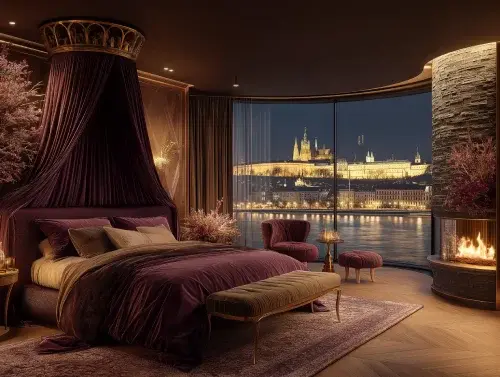
Hotel Guest Rooms

Luxury Hotels & Resorts

Boutique Hotels

Hotel Lobbies
Present the Hotel Before the Mock-Up Room
Render the lobby, a guest room and the façade from photos or model views, so owners and operators can pick a direction early.
AI Hotel Rendering for Owners, Operators and Designers
Hotel projects are sold on images long before they open: to owners, operators, brands and investors. ArchiVinci renders the spaces that carry a hotel's identity, the arrival, the lobby, the guest room and the restaurant, from a photo, a sketch or a model view, so options can be compared early and cheaply.
From a photo of an existing hotel: a lobby or guest room photo plus a description of the refurbishment; the Interior module is asked to keep the room's walls, windows and camera angle (AI interior design explains how).
From concept drawings and models: a concept sketch or a SketchUp, Revit or Rhino view becomes a presentation render, as on 3D model to render.
For the building and the arrival: a photo or model view of the façade and the entrance goes into the Exterior module. See AI exterior design.
For marketing views: with a plan, a render can become a 360° panorama (AI panorama generator) or a 10-second video (AI image to video, with coins).
A new account gets 3 free credits. A mock-up room is a good first test.
Hotel Room Rendering, Step by Step
Upload one image of the guest room or the lobby to the Interior module: a photo of a mock-up room, a sketch or a 3D model view (JPG, PNG or WebP, up to 5 MB).
Describe the room as a guest would see it: the bed wall, the furniture, the materials and the mood. The look comes from these words; there is no style menu.
Seating, Plants, Lamps and Accessories are available as Add object tags; a headboard design or a minibar unit is described in the prompt.
Choose a lighting option: Warm light for an evening room, Daylight for a resort room with a view, Twilight for a lobby at dusk.
Generate. With a plan, one run brings up to four versions of the room, a quick way to compare finish packages; free accounts make one image per run.
Swap the headboard, the carpet or the curtains alone: mark them with Edit render under the result.
To compare finish packages for the same room type, keep the same base image and change only the material part of the prompt. Each run is a new image, so expect small differences between versions beyond the materials you changed.
Hotel Interior Prompts
These name the space, its key furniture, a few materials and the light:
A boutique hotel guest room with an upholstered green headboard wall, walnut side tables, a bouclé armchair and warm bedside lights
A hotel lobby with a long travertine reception desk, a double-height ceiling, velvet lounge seating and large plants under warm light
A resort suite with a king bed facing floor-to-ceiling windows, rattan furniture, a stone floor and soft daylight

Hotel Interior Ideas from Arrival to Guest Room
Arrival and Lobby
The lobby sets the price point. Compare a calm, residential lobby with a busy, social one on the same photo or model.
Guest Room Finish Packages
Two or three palettes for the same room type: wood tones, carpet or hard floor, headboard fabric, curtain colors. Same base image, different material prompts.
Restaurant and Bar
Hotel restaurants and bars follow the same steps; see AI restaurant design for prompts.
Façade and Evening Light
Run the building with Golden hour and Twilight to see how the entrance canopy, the signage and the window glow read at dusk. Twilight gives dusk with the lights on; a full night view is a typed request in the Edit module.
Guest Room, Resort, Boutique Hotel and Lobby Prompts
For the four hotel spaces in the cards above:
Hotel guest rooms: comfort first, a clear bed wall.
A city hotel room with a tufted fabric headboard, a wall-mounted desk, a dark oak floor and a window bench with cushions
Luxury hotels and resorts: space, natural materials, the view.
A luxury resort room with a canopy bed, a limestone floor, a freestanding bathtub by the window and a terrace to the sea
Boutique hotels: a strong theme in a small footprint.
A boutique hotel room with deep blue walls, a brass reading lamp, a vintage rug and a small velvet sofa
Hotel lobbies: reception, lounge and bar in one view.
A hotel lobby with a marble reception desk, a lounge of low armchairs around a fireplace and a bar counter with brass shelving
What Stays with the Hotel Design Team
Room sizes, key counts and the check against building, fire, accessibility and brand standards.
The FF&E schedule and its prices: a render shows furniture, it does not specify it.
The final comparison: each image is generated anew from your upload, so look at it beside your photo or model before it goes to the owner.
Licensing for marketing: a sales brochure or a booking site is commercial use and needs an active plan.
More Hospitality Use Cases
AI cafe design for a lobby café.
AI villa design for resort villas.
AI landscape design for gardens and pool areas.
AI rendering for any other space you want to render.
What is commercial rendering?, on renders for hotel and hospitality brands.
Hotel design and rendering FAQ
Can AI render hotel rooms consistently across a series?
Partly. Keep the same base image and change only the material part of the prompt, and the versions will be close. Each run is a new image, though, so small details such as a lamp or the bedding can differ between versions.
Can I make a 360° view of a hotel room?
Yes, with a plan: the panorama tool turns an image into a 360° panorama image (a JPEG), useful for a first immersive impression. It is generated from your image, not measured from a model.
Can I design a hotel lobby with AI?
Yes. Upload a photo or a model view of the lobby to the Interior module and describe the reception, the seating, the materials and the light. Warm light and Twilight show the lobby in its evening mood.
Does ArchiVinci check a hotel design against brand standards?
No. It renders images and reads no brand manual, regulation or room-size standard. Use the images to discuss options; the standards check stays with the design team.